
Carter County Arrests Today
The fastest official route for Carter County arrests today is the Zuercher reports view. Set Report Date to Today, or the shortest recent period the system offers. Choose an arrest-related Report Title where one exists. Set Agency to Carter County Sheriff. The list can display report title, date, agency, and a document link.
A public directory calls the service arrest reports and calls for service. It also states plainly that name search is unavailable. What you get is a set of reports posted during the period. That is not a census of every booking in a rolling 24 hours. A report can describe an arrest before jail intake finishes. Approval, entry, and syncing all take time. The report date may not match the exact booking time. Note the date you searched.
A blank search does not mean no arrest occurred. Check the jail roster as well, and confirm time-sensitive questions directly with the Sheriff.
Check Carter Arrests Step by Step
Start with the report portal, since it gives the shortest official event window. Then switch systems based on your question. The roster answers present custody and shows a booking photo. VINE handles custody status and alerts. A report request is the fallback when the live screens fall short.
- Open the Zuercher report route and choose Today or the shortest recent date range.
- Filter by Carter County Sheriff and an arrest-related report title if those options are present.
- Open the report and distinguish report date, incident date, and any stated arrest time.
- Search the Sheriff inmate roster by exact name to check current custody.
- Use the charge action and VINE notification link only for the matching person.
- Call 423-542-1845 or submit a report request if timing or identity remains uncertain.
A report can exist without a roster entry. The person may have been released, transferred, booked by another authority, or never held in Carter County custody. The reverse happens too. A roster entry can appear while the report still waits for publication.
Carter Same-Day Report Fields
The report list is narrower than a booking record on purpose. Its filters and columns point to a report, a date, and an agency. There is no person-name roster here. The list view shows no booking photographs either. Open the linked report for incident detail. Then use the jail roster for custody fields.
| Field or control | What it tells you |
|---|---|
| Report Date | The portal date used to narrow the short window. |
| Report Title | The event or report category as published. |
| Agency | The public-safety office attached to the report. |
| Report link | Opens the underlying document when available. |
| Name search | Not advertised for this report list. |
| Booking photo | Not shown in the reports list; check the roster. |
The separate inmate interface offers richer custody fields. Think name, race, sex, cell block, arrest date, held-for agency, in-custody date, and release date, with mugshot and hold details in results. Those belong to the inmate route. The same-day report list does not display them. Keep the report layer and the custody layer separate.
Check Carter County court records for charge amendments, dismissals, or final disposition.
Why Fresh Carter Bookings Lag
Carter County publishes no fixed roster refresh interval. It promises no report-posting time either. An arrested person moves through transport, identity checks, property inventory, medical screening, photograph capture, charge entry, and data validation before the public screens align. The detention page mentions electronic tracking and a body scanner but says nothing about minutes.
Weekends and holidays can slow publication unevenly because approvals differ. No source says booking stops. The portal runs no special weekend rule. Do not expect a predictable morning update. For a specific event, compare the report date, the roster's custody state, and a VINE result. If a safety or release question cannot wait, use the official phone channel rather than a commercial page.
Release creates the opposite lag. A person can drop off the current roster while an event report stays online. The court case may continue after both. Current custody, historical arrest, and final disposition are three different facts.
Carter Roster and Photo Check
The Sheriff's roster offers a general name search, booking images, a View Charges option, and Notify Me of Status Change. It is the strongest official path for the Carter County Detention Center. Does a named person appear in custody? Does a booking photo show? The Sheriff does not promise a photograph for every intake or a fixed display period. Start at the official Carter roster.
Search the exact spelling. Check identifiers before assuming a match. If nothing appears, try the event report, then the records route. A missing entry can reflect release, transfer, correction, a protected record, intake delay, or an outage. It does not prove the arrest never happened.
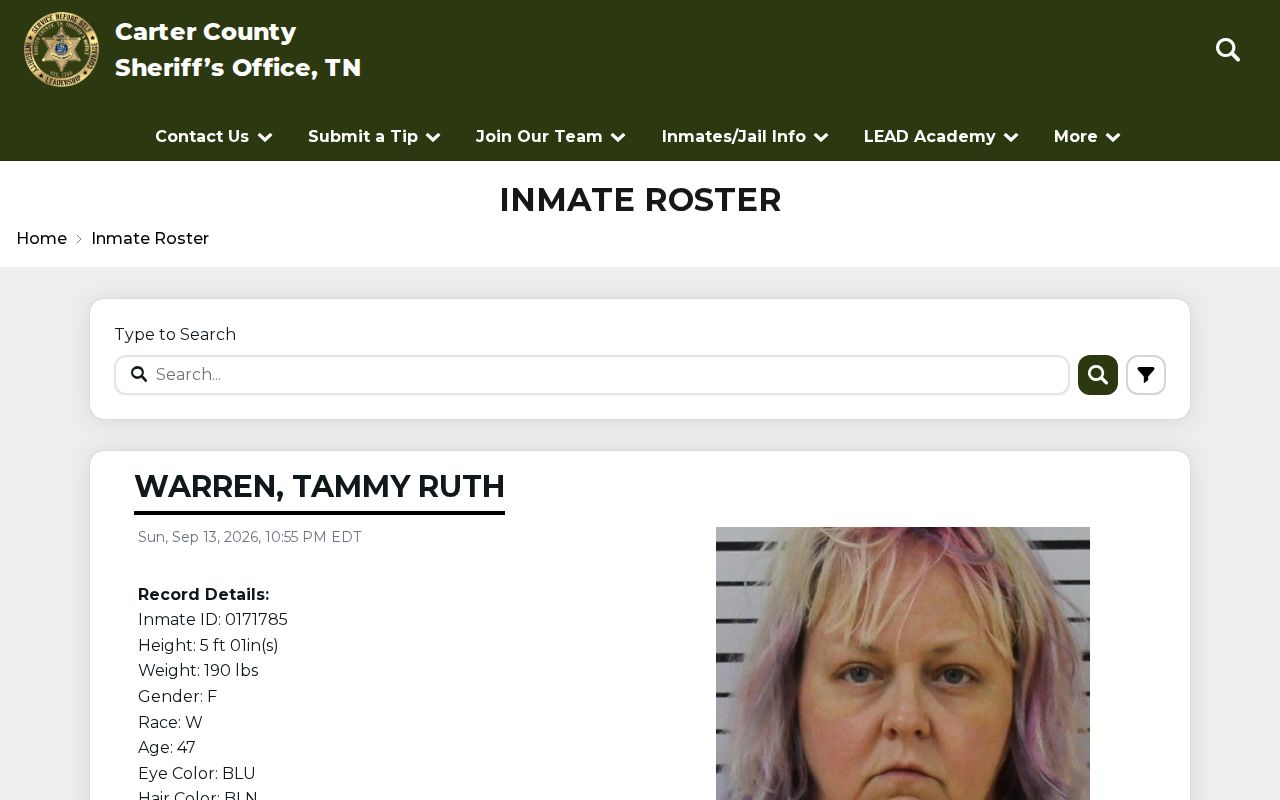
The live roster always controls, because names, charges, and custody states can change after any page image is saved.
Carter Report Window in Practice
The official report source uses the same route for short and expanded date ranges.
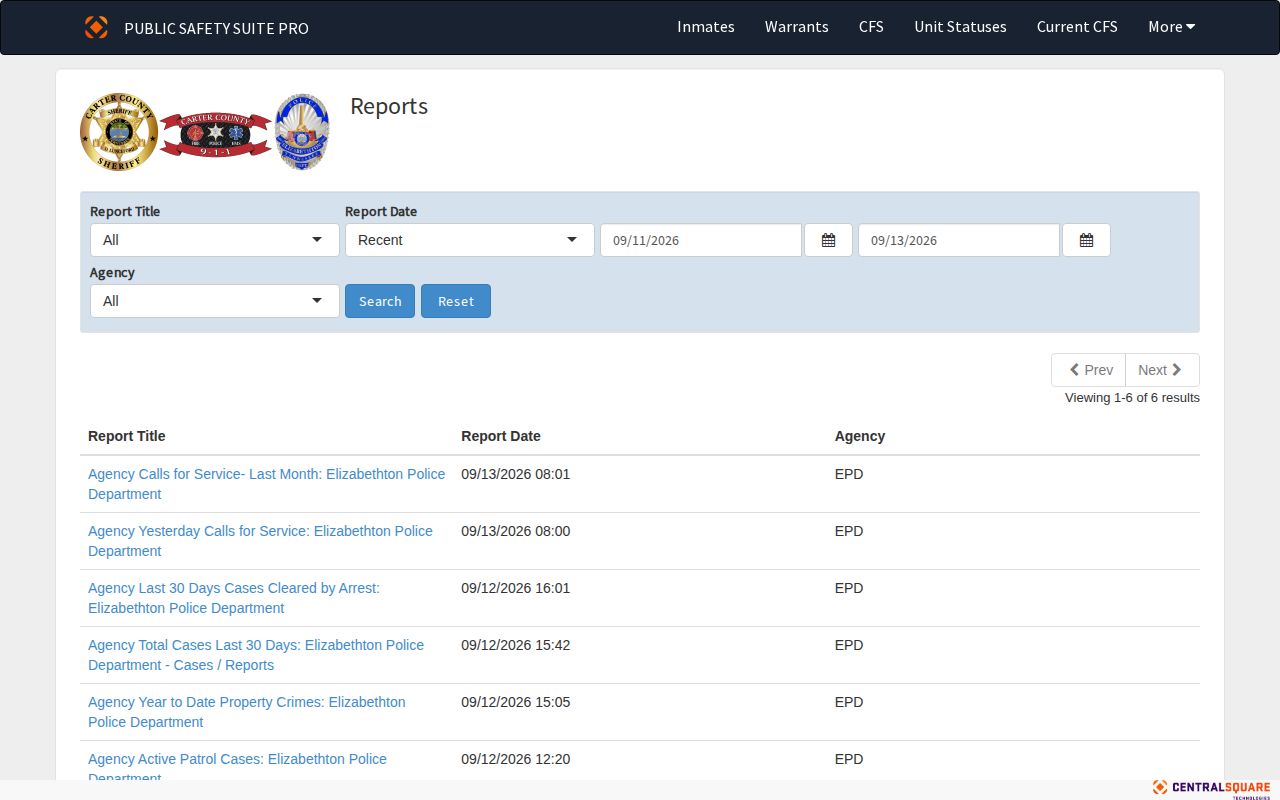
The date-filtered Carter County view shows bookings from whatever span a visitor selects. It is a live tool, not a stored archive of every arrest in that window. Treat it as one slice of the record, not the whole picture.
Calls for service sit in a separate Zuercher screen. A CFS entry can list the date, incident code, street, status, disposition, beat, zone, agency, call number, and responding units. That is dispatch context. It is not an arrest report on its own.
Official Carter Digital Channels
The Sheriff's home page links to an official share page. That page covers the Carter County Sheriff TN mobile app. Its listing mentions news, tips, and communication. One user review mentioned inmate photos. A review is not a promise, though. App versions shift between platforms and can change without notice. So treat the app as a backup channel. Lean on the web roster for booking photos.
The roster's Notify Me button points toward VINE status registration. The VINE Arrest Check helps track one named person past a first arrest check. It walks through Tennessee SAVIN sign-up, PIN use, and its limits. Carter County Alerts on OnSolve is a community notice system, not a booking feed.
Confirm an Arrest Offline
Online results missing or conflicting? Go offline. For fast custody questions, call the Carter County Sheriff's Office at 900 E Elk Avenue, Elizabethton, TN 37643, dispatch 423-542-1845. Need a Sheriff report already on file? Use the Request Report page. County copy rules run through the public-records coordinator, reachable via the county Public Documents page.
A strong request names the person. Give the full name, rough arrest and booking dates, the arresting or holding agency, report type, and whether a booking photo is wanted. Ask for a cost estimate first. Carter has posted no guaranteed photo fee. Tennessee rules generally require production, a written denial, or an acknowledgment with an estimated response time inside seven business days.
Ask for a record that exists. Do not ask the office to build a new list. If the file belongs to a city police department, another county, a state agency, or a federal authority, route the request to the right custodian. That matters most for Johnson City, which sits mostly in Washington County.
After Today’s Carter Arrest
A same-day arrest view is a starting point. The Carter County Circuit Court Clerk posts General Sessions and Circuit Criminal dockets, monthly PDFs, and a case-search route. Later entries may show a continuance, dismissal, bound-over status, capias, bond change, attorney appearance, or final result. Booking charges can shift as a case moves.
To widen the window and add local news context, visit the Carter County Arrest Reports page. It stretches the portal date range. That page also separates the official report view from the Elizabethton Star's selective multi-day digest.
- Arrest time
- When law enforcement took the person into custody.
- Booking time
- When the jail recorded intake.
- Report date
- The date attached to the published report.
- Disposition
- The later court outcome or procedural status.